CSV/XML to Table WordPress plugin – Convert data files into tables

Quickly display CSV or XML data as clean, readable tables directly inside the WordPress block editor.

CSV/XML to Table is a lightweight Gutenberg plugin that allows you to upload CSV or XML files and instantly convert them into responsive HTML tables inside your content – no manual formatting or coding required.

Perfect for publishing structured data such as product lists, reports, pricing tables, datasets, or catalogs.
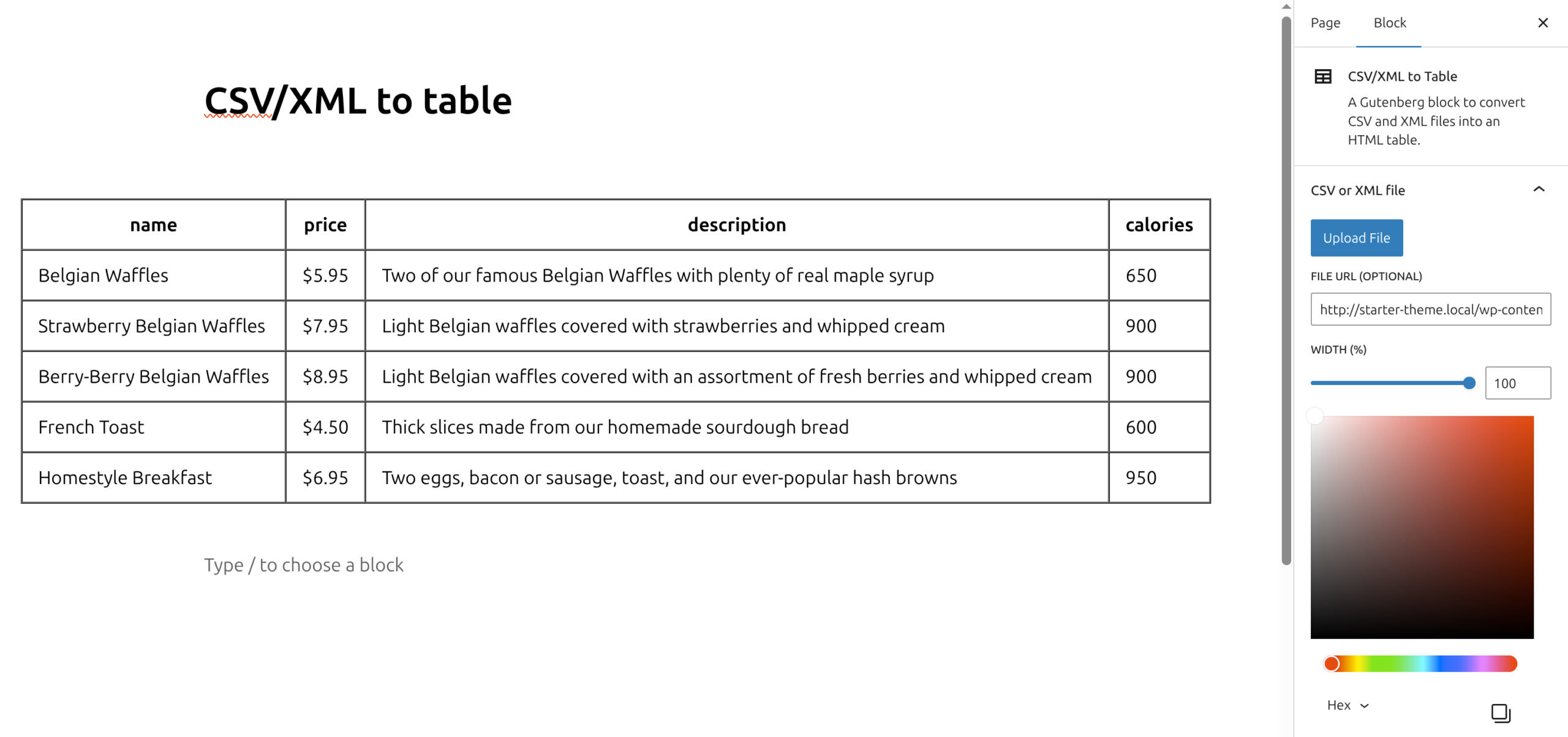
How the CSV/XML to Table plugin works

Your data instantly appears as a formatted table inside your post or page.

1

Install and activate CSV/XML to Table

2

Open the WordPress block editor and add the CSV/XML to Table block

3

Upload your CSV or XML file

4

The plugin automatically converts the data into a table

Why use the “CSV/XML to Table” WordPress plugin?

csv-xml-to-table
  • Display CSV files as tables directly in WordPress
  • Convert XML datasets into readable HTML tables
  • Native Gutenberg block integration
  • Automatically parses structured data files
  • Responsive tables that work on mobile devices
  • Works with any WordPress theme
  • Simple workflow – upload file and publish
  • No coding or manual HTML table creation required

This plugin helps content creators, analysts, and website owners present structured data in a clean and organized way without relying on complex table builders.

Frequently asked questions about the “CSV/XML to Table” plugin

  • What does this plugin do?

    It converts CSV or XML files into responsive HTML tables that can be displayed directly inside the WordPress block editor.

  • Which file formats are supported?

    The plugin supports CSV (Comma-Separated Values) and XML files.

  • Do I need technical knowledge to use the plugin?

    No. Simply upload your file in the block editor and the plugin will automatically generate the table.

  • Can I style the table?

    Yes. The plugin generates standard HTML tables that can be styled using your theme or custom CSS.

  • Is the table responsive on mobile devices?

    Yes. Tables generated by the plugin are designed to work across different screen sizes.

  • Can I update the table data later?

    Yes. Simply update your CSV or XML file and upload it again to refresh the table data.

  • Does this plugin work with all WordPress themes?

    Yes. The plugin uses standard Gutenberg blocks and should work with any properly coded WordPress theme.

Need a Custom WordPress Plugin?

If you need something specific for you…

We can build a custom WordPress plugin tailored exactly to your needs.

No bloated features. Only what your project needs.